
If you work with BGP and Internet routing, you probably know that RPKI is something worth paying attention to.
ROA validation is an important part of routing security, but checking a prefix once doesn’t necessarily tell you what might happen tomorrow. ROA data can change, validation results can differ between sources, and keeping track of multiple prefixes manually can become a bit of a chore.
I’ve been thinking about how to make this process easier, so I built something that I’d like to share with the networking community: APIK RPKI Monitor.
You can access it at RPKI Monitoring.
The idea isn’t to make RPKI more complicated than it needs to be. I wanted to bring a few useful things together in one place: checking ROAs from different sources, comparing the available results, and monitoring prefixes over time.
Checking ROAs without jumping between different sources
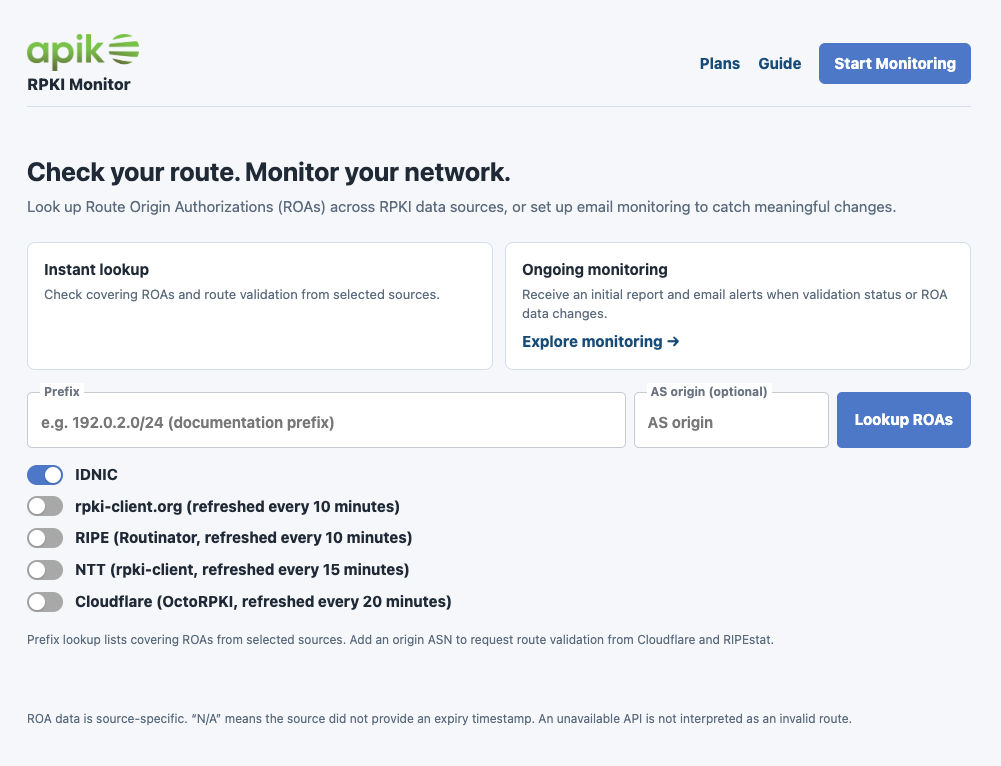
One of the first things you’ll find on the platform is the ROA lookup feature.
You enter an IP prefix, select the RPKI sources you want to check, and review the results in one place. If you also provide an Origin ASN, you can request route validation from supported services.
The platform currently brings together several sources:
- IDNIC
- rpki-client.org
- RIPE (Routinator)
- NTT
- Cloudflare (OctoRPKI)
I find having these sources accessible from a single interface useful when investigating a prefix or trying to understand why different validators might report different results.
Each source has its own data and refresh cycle, so the results aren’t necessarily identical at every moment. Still, being able to compare them without opening several different tools makes the process more convenient.
Because checking a prefix once isn’t always enough
This is where the monitoring feature comes in.
Imagine you’ve checked your prefix today and everything looks good. A few days later, the ROA data changes. Unless you’re checking it regularly or have another monitoring mechanism in place, you might not notice the change straight away.
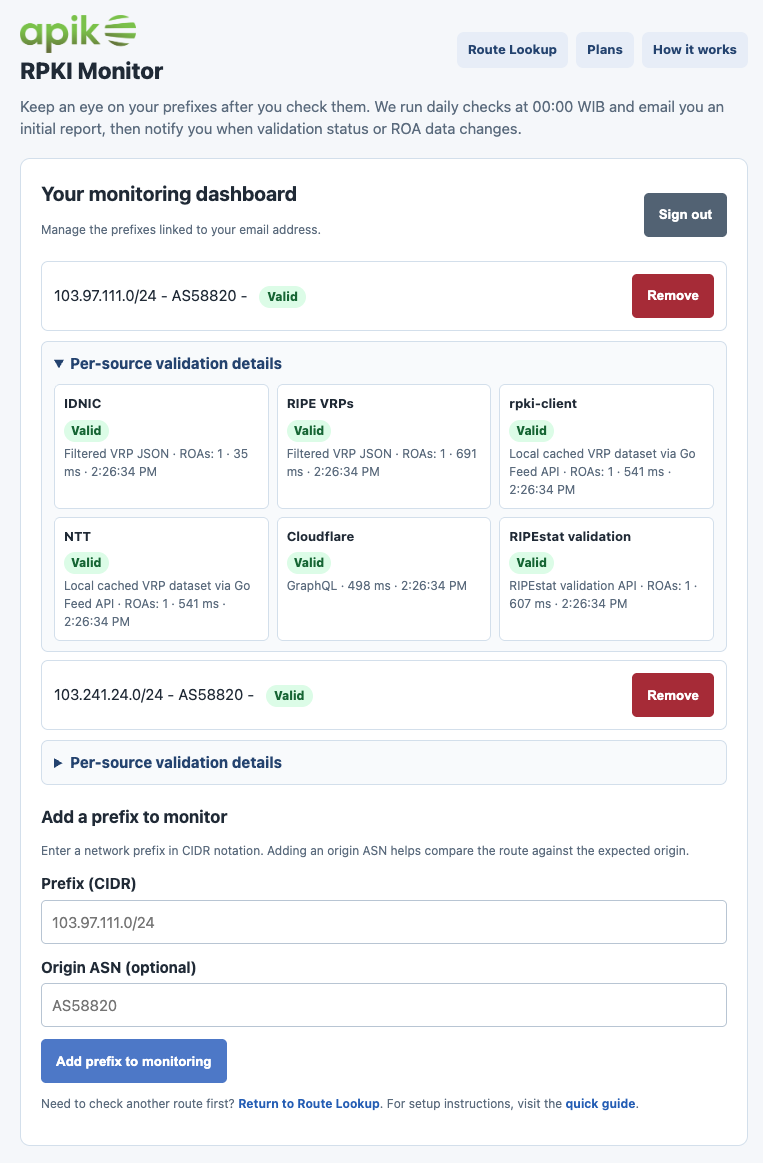
With APIK RPKI Monitor, you can register prefixes for ongoing monitoring and receive an initial report by email. The service then sends email notifications when it detects changes in validation status or ROA data.
There’s also a dashboard where you can see which prefixes you’re monitoring, review their validation status, and check the results reported by individual sources.
The goal is pretty straightforward: spend less time repeating manual checks and have a convenient way to keep an eye on the prefixes that matter to you.
A few plans, depending on what you need
Not everyone needs to monitor dozens of prefixes. Some people just want to experiment with RPKI, while others need to keep track of a larger network.
That’s why the platform offers several plans:
- Free: Up to 2 monitored prefixes per email address
- Commercial S: Up to 4 prefixes
- Commercial M: Up to 16 prefixes
- Commercial L: Up to 32 prefixes
- Enterprise: Custom prefix limits and monitoring schedules
All plans include daily monitoring and email notifications. Live Probes are available from Commercial S, while API access is available with Commercial L and Enterprise. Other features depend on the active plan configuration.
The idea is to keep things accessible for people who only need basic monitoring, while providing options for networks with more demanding requirements. For details plans and features, please visit RPKI Monitoring plans.
Yes, there’s a free plan for the Internet community
This is probably the part I want to highlight the most.
The Free plan is available to the Internet community, with support for monitoring up to two prefixes per email address.
If you’re a network engineer, work at an ISP, are learning about BGP and RPKI, or simply want to check your own prefixes, you’re welcome to give it a try.
You don’t need to start with a commercial plan just to explore the service and see whether it’s useful for you.
APIK RPKI Monitor is supported by PT. APIK Media Inovasi (AS58820). I hope making the Free plan available will give more people an opportunity to work with RPKI data and become more familiar with route-origin validation.
For me, sharing useful tools with the community is just as important as building something that works for a specific operational need.
This is just the beginning
There’s still room to improve the platform, and I’d like it to evolve based on real-world needs rather than assumptions about what network operators might find useful.
If you try it, I’d genuinely appreciate your feedback. Whether it’s a bug you’ve found, a feature you’d like to see, or an idea that could make the workflow better, I’d be happy to hear about it.
I’m sharing this in the hope that it becomes a useful little tool for the people who work with Internet routing every day.
Give it a try, and let me know what you think.
Happy routing! 🚀
- bird2 (2) ,
- routing-security (1) ,
- security (1) ,
- routing (1) ,
- rpki (1) ,
- roa (1) ,
- kadabra (2) ,
- indonesia (2)
